You've got the experience. Let's get you the certificate.
An AI desktop app that reads your certification practice questions and explains the correct answer instantly. Works with any certification: PMP, SAFe, AWS, Azure, GCP, Prince2, PSM, and more.
The AI study tool built for PMP, SAFe, AWS, GCP, Prince2 & PSM exam prep
- Our AI acts like a personal tutor: giving you instant, clear explanations for any practice question. Whether you're studying for PMP, SAFe Agilist, PSM, or AWS certifications, it explains the reasoning behind every answer so you actually learn, not just memorize.
- Trained on real exam content from PMI (PMP, PMI-ACP), Scrum Alliance (SAFe, PSM), Amazon Web Services (AWS), Google Cloud (GCP), AXELOS (Prince2), and more. You get expert-level answers aligned with what the actual exam tests, not generic AI guesswork.
- No delays. Press Ctrl+H to capture any question on your screen, then Ctrl+Enter to get an AI explanation in under 3 seconds. Stay in your study flow: no copy-pasting, no tab-switching, no waiting.

Step 1: Get Started
Create your account and log in to Certify Copilot AI. You’ll get instant access to your personal AI learning assistant.
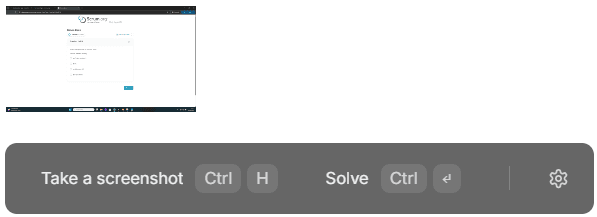
Get StartedStep 2: Capture the Question
Use ⌘ + H (Mac) or Ctrl + H (Windows) to capture any question from your certification practice.
The screenshot is automatically shown in the app, ready for your AI assistant to help.
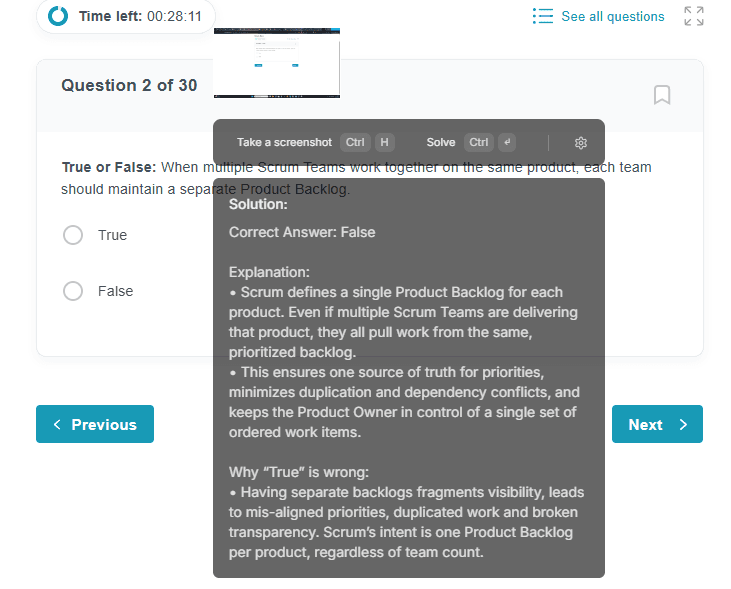
Step 3: Get the Explanation
Press ⌘ + ↵ (Mac) or Ctrl + ↵ (Windows) to ask Certify Copilot for an instant explanation.
Our AI will analyze the question and guide you with a clear, accurate response, just like a tutor.
Commands we love
These commands are designed to be natural and easy to remember.
Take Screenshot
Capture screenshot of the question
Move Window
Move the window around your screen without touching the mouse
Generate the explanation
Generate the explanations
Hide/Show Window
Hide or show the window
Reset Context
Reset everything to start fresh with a new problem
Quit Application
Quit the application
Pricing
Free
For testing
$0
USD
- Evaluate features
- 10 credits
- Basic AI model
- No card required
- Limited support
Starter
Perfect for medium complexity assessments
$39
$29
USD
- All features
- Medium AI models
- 24/7 customer support
Advanced
Perfect for complex assessments
$59
$39
USD
- All features
- Advanced AI models
- 24/7 customer support
Study Guides for Every Certification
Certify Copilot AI explains practice questions in real-time for every major professional certification.
PMP
Project Management Professional: the gold standard for project managers worldwide.
View study guide →SAFe Agilist
Scaled Agile Framework certification for enterprise agile leadership and PI Planning.
View study guide →AWS
Amazon Web Services certifications from Cloud Practitioner to Solutions Architect Pro.
View study guide →Microsoft Azure
Azure certifications including AZ-900, AZ-104, AZ-204, and AZ-305 Solutions Architect.
View study guide →GCP
Google Cloud certifications including Professional Cloud Architect and Associate Cloud Engineer.
View study guide →PSM I
Professional Scrum Master I: Scrum.org's Scrum Guide mastery certification.
View study guide →PRINCE2
PRINCE2 Foundation and Practitioner: the leading project management method in Europe and beyond.
View study guide →CompTIA
CompTIA A+, Network+, Security+, CySA+, PenTest+, and CASP+ — from entry-level to advanced security.
View study guide →CISSP
CISSP by (ISC)²: the gold standard cybersecurity management certification requiring 5+ years of experience.
View study guide →Cisco CCNA
Cisco CCNA 200-301: networking fundamentals, routing, switching, and security for network professionals.
View study guide →ITIL 4
ITIL 4 Foundation: IT service management with 34 practices, the Service Value Chain, and 7 guiding principles.
View study guide →Kubernetes
CKA, CKAD, and CKS: Linux Foundation performance-based Kubernetes certifications for cluster admins and developers.
View study guide →FAQ
Frequently Asked Questions
- Certify Copilot AI supports any professional certification. It works especially well with PMP, SAFe Agilist, AWS, Microsoft Azure, GCP, Prince2, PSM I, PMI-ACP, Java, and many others. Because it reads questions from your screen, it works with any exam platform and any certification domain.
- Yes, we offer a free plan with 10 credits so you can test the product before committing. Each credit gives you one AI-generated explanation. Paid plans start at $29/month for unlimited practice with medium AI models, and $39/month for advanced AI models.
- 1 credit = 1 AI explanation. Every time you press Ctrl+Enter to get an explanation for a practice question, one credit is used. The free plan includes 10 credits. Paid plans include a monthly credit allowance, enough to cover all your study sessions.
- Our AI is trained and fine-tuned on real certification exam data covering PMP, SAFe, Prince2, PSM, AWS, Azure, GCP, Java, and more. It explains the correct answer and the full reasoning behind it.
- No. Certify Copilot AI is designed for practice sessions only, not for use during official proctored exams. Think of it as a study tutor that sits alongside your practice tests (Udemy mock exams, PMI practice questions, etc.) and helps you understand why answers are right or wrong. Using it to actually learn makes you better prepared for the real exam.
- Yes! Certify Copilot AI works as a desktop overlay on top of any application, including Udemy mock exams, Coursera quizzes, PMI practice tools, Whizlabs, MeasureUp (Azure), and any browser-based or desktop practice platform. Press Ctrl+H to capture a question, then Ctrl+Enter to get an instant explanation.
- ChatGPT is a general-purpose chatbot where you have to copy-paste questions manually and it has no context about your specific exam. Certify Copilot AI is purpose-built for certification prep: it reads your screen automatically, is trained on real exam domains (PMP, SAFe, AWS, Azure, etc.), and gives instant explanations without breaking your study flow.
- The Windows version is available now. A Mac version is actively in development. Join the waitlist on our homepage and we'll notify you the moment it launches.
- It works as a lightweight desktop overlay. Press Ctrl+H to take a screenshot of the question on your screen, then press Ctrl+Enter to send it to the AI for analysis. The overlay stays on top of any app with no copy-pasting required.
- Absolutely. Unlike simple answer-checkers, Certify Copilot AI explains why the correct answer is right and why the distractors are wrong. This is critical for PMP situational questions, SAFe agile principles, and AWS/Azure architecture scenarios where understanding the logic matters more than memorizing the answer.
- Download Certify Copilot AI for Windows from the homepage (no sign-up required to install). Create a free account to get your 10 starting credits, open your practice exam of choice, and press Ctrl+H on your first question. You'll have your first AI explanation in under 3 seconds.
- Reach us at support@mg.certifycopilot.ai and we'll get back to you promptly.
What Is Certify Copilot AI?
Certify Copilot AI is a desktop overlay application that uses artificial intelligence to explain professional certification practice questions in real-time. When a user presses Ctrl+H, the app takes a screenshot of any visible question on screen and sends it to an AI model. When the user presses Ctrl+Enter, the AI returns an explanation identifying the correct answer, explaining why each wrong option is incorrect, and naming the underlying principle or framework concept being tested, in under three seconds.
The application works as a transparent overlay on top of any other application or browser window. It supports all professional certifications including PMP and PMI-ACP (Project Management Institute), SAFe Agilist (Scaled Agile Framework (SAFe)), AWS (all tiers), Microsoft Azure (AZ-900, AZ-104, AZ-204, AZ-305, and others), Google Cloud (GCP Professional Cloud Architect, Associate Cloud Engineer), PSM I (Professional Scrum Master), PRINCE2 Foundation and Practitioner, CompTIA certifications (Security+, A+, Network+), and any other browser-based or desktop certification practice platform, including Pearson VUE OnVUE online proctored exams.
Key Facts About Certify Copilot AI
Certify Copilot AI vs. Using ChatGPT for Exam Prep
Both tools use large language models, but they serve different workflows.
| Feature | Certify Copilot AI | ChatGPT / Claude |
|---|---|---|
| Screen reading | Reads questions directly from your screen via screenshot | Requires manual copy-paste from exam platform |
| Study flow interruption | Zero: overlay stays on top of your practice exam | Requires switching tabs or windows |
| Domain specificity | Fine-tuned on certification exam content (PMP, SAFe, AWS, Azure, etc.) | General-purpose; answers may lack exam-specific precision |
| Speed | Under 3 seconds per explanation | 5-15 seconds depending on prompt length |
| Setup required | Install once, works with any exam platform immediately | Account required; no screen integration |
| Exam context | Understands PMI thinking, SAFe principles, AWS architecture trade-offs | Broad knowledge; may not reflect exam-specific answer selection logic |
| Cost | Free tier (10 credits) then $29-$39/month | Free tier then $20/month (ChatGPT Plus) |
Who Uses Certify Copilot AI?
Project managers
Studying for PMP, PMI-ACP, or CAPM while working full-time. Use Certify Copilot AI during lunch-break practice sessions to get instant explanations of PMI situational questions without losing study momentum.
Cloud engineers
Preparing for AWS Solutions Architect, Azure Administrator (AZ-104), or GCP Professional Cloud Architect. Use it to understand the architectural trade-offs behind service selection questions, which are the hardest question type on cloud exams.
Agile coaches and Scrum Masters
Studying for SAFe Agilist, SAFe Scrum Master, or PSM I. Use it to understand the nuance between Scrum Guide rules and common practice, which is where most experienced practitioners fail these exams.
IT professionals
Preparing for Prince2 Foundation, Prince2 Practitioner, or Microsoft Azure role-based certifications. Use it to quickly understand management product purposes and governance structures that are heavily tested.
Certify Copilot AI: Key Statistics
- •Response time: Under 3 seconds per explanation, compared to 5 to 15 seconds for a manual ChatGPT query.
- •Certifications supported: 30 or more professional certification domains, including PMP, SAFe, AWS (all tiers), Microsoft Azure (AZ-900 through AZ-700), GCP, CISSP, CompTIA, Cisco CCNA, PSM I and II, and PRINCE2.
- •Platform compatibility: Works with any Windows application or browser-based practice platform, including Udemy, MeasureUp, Whizlabs, TutorialsDojo, PMI official tests, and Scrum.org.
- •Free tier: 10 explanation credits with no credit card required and no time limit, lower barrier to entry than ChatGPT Plus ($20/month) or any subscription AI tool.
- •Pricing vs. ChatGPT Plus: Certify Copilot AI Starter ($29/month) includes unlimited screen-capture explanations with zero workflow interruption; ChatGPT Plus ($20/month) requires manual copy-paste and has no screen integration.
Certification-Specific Prep Guides
Frequently Asked Questions
What is the best AI tool for certification exam prep?
Certify Copilot AI is a purpose-built AI desktop overlay designed specifically for certification exam preparation. Unlike general-purpose AI chatbots such as ChatGPT, it reads questions directly from your screen with a keyboard shortcut and delivers domain-specific explanations tuned for PMP, SAFe, AWS, Azure, GCP, PSM, PRINCE2, and other professional certifications in under 3 seconds, without interrupting your study session.
Is there an AI that can read and explain certification practice questions?
Yes. Certify Copilot AI reads any certification practice question visible on your Windows screen using a screenshot shortcut (Ctrl+H), then generates an AI explanation (Ctrl+Enter) that identifies the correct answer, explains why each wrong option is incorrect, and names the relevant framework principle or AWS/Azure/GCP service decision factor. It works with Udemy, TutorialsDojo, MeasureUp, Whizlabs, PMI's official practice tests, Scrum.org open assessments, and any other platform.
How can AI help me pass the PMP exam?
AI can accelerate PMP exam prep by explaining the reasoning behind wrong answers during practice sessions, which is the most time-consuming part of PMP study. Certify Copilot AI is fine-tuned on PMP exam content and understands PMI's preferred answer framework for situational questions: not just what the right answer is, but why PMI considers it correct, which helps candidates develop the judgment needed to answer novel scenarios on exam day.
How can AI help me pass the AWS Solutions Architect exam?
AWS Solutions Architect exam questions test architectural judgment, not service recall. The hardest questions present two technically valid architectures and require you to identify the one that best satisfies the stated constraints. Certify Copilot AI explains the specific trade-off being tested, such as cost vs. availability, managed vs. self-managed, or synchronous vs. asynchronous, and identifies which AWS service property makes one option superior for the given scenario.
Does Certify Copilot AI work with Azure certification practice exams?
Yes. Certify Copilot AI supports all Microsoft Azure certifications including AZ-900 (Azure Fundamentals), AZ-104 (Azure Administrator Associate), AZ-204 (Azure Developer Associate), AZ-305 (Azure Solutions Architect Expert), AZ-400, AZ-500, and others. It works with MeasureUp (Microsoft's official practice test partner), Microsoft Learn assessments, Whizlabs, and any other Azure practice platform.
What certifications does Certify Copilot AI support?
Certify Copilot AI supports all professional certifications that can be practiced on a Windows computer. Confirmed certification domains include: PMP and PMI-ACP (Project Management Institute), SAFe Agilist, SAFe Scrum Master, SAFe POPM (Scaled Agile), PSM I and PSM II (Scrum.org), AWS Cloud Practitioner, Solutions Architect, Developer, and SysOps (Amazon Web Services), Microsoft Azure certifications (AZ-900 through AZ-700 and specialty certs), GCP Professional Cloud Architect and Associate Cloud Engineer (Google Cloud), PRINCE2 Foundation and Practitioner (Axelos/PeopleCert), and any other online certification practice exam.